
Bluehost AI Builder turns a plain-language description into a small business website or browser tool, and it fits owners who want a working draft before paying. It is $0 to start, no credit card, and you can try Bluehost AI Builder here.
The main tradeoff is control. Paid plans from $20/mo add a custom domain and more credits, but the platform gives no source-code access, built-in backups, direct site import or online payments.
Start by writing down the pages, business details and action you want visitors to take, then build a preview on the Free plan. Check the result before choosing a paid plan, especially if you need a store, a native mobile app or an easy move to another platform.
Key takeaways
- AI Builder Free is $0 to start with no credit card, but it uses a
.app.bluehost.aiaddress. - Paid plans start at $20/mo and add custom-domain connections; renewal prices appear at checkout.
- Each message that creates, changes or fixes the project uses one credit.
- It suits informational sites and browser tools better than stores, native apps or content-heavy WordPress sites.
- Keep copies of your text, images and data because there is no built-in restore backup or full export.
What happened when we built a site with it
This was a Free-plan test build on November 10, 2026, for a made-up bakery. The whole prompt was one sentence: "A website for a small family-run bakery in Texas, with a home page, a menu of breads and pastries, our story, opening hours, and a contact page with a map and phone number." Sign-up appeared only after we clicked Build for free, with Google, Apple, GitHub or email options. An optional four-question survey came up during the build, and we skipped it.
The first version took about 3 minutes, with a progress checklist along the way. The checklist displayed raw technical notes, such as a timezone configuration line, which looks unpolished but did not affect the result. The AI named the site "Texas Family Bakery" and produced five pages: home, menu, our story, hours, and contact with a map and phone number. It chose a warm wheat and brown palette, used stock photos on the home page and placed the bakery in Austin, Texas on its own.
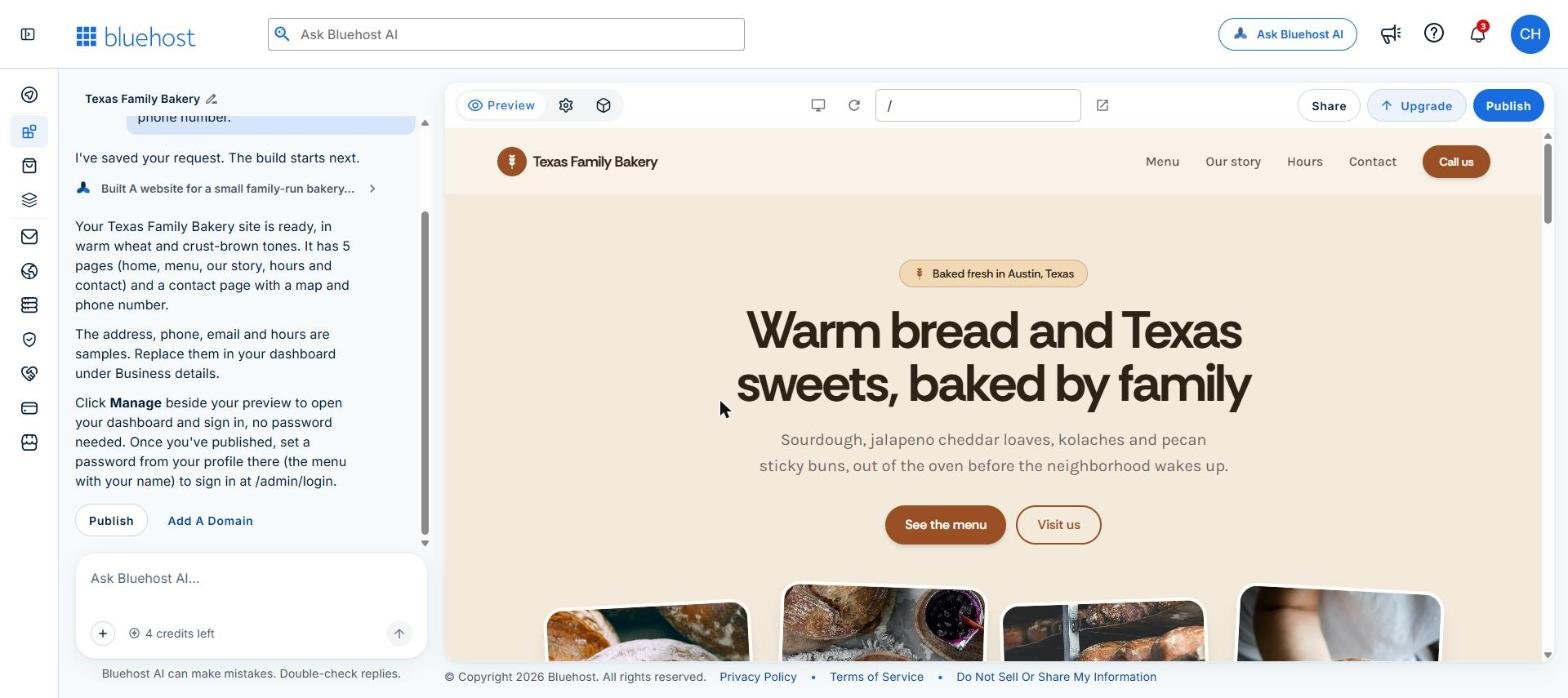
The address, phone number, email and opening hours were samples, and the AI said to replace them under Business details. The menu prices, such as $8.50 for a country sourdough, were generated samples too (sample prices checked November 10, 2026). Replace all of it before you publish. The first build used 1 credit, leaving 4 of the 5 free credits.
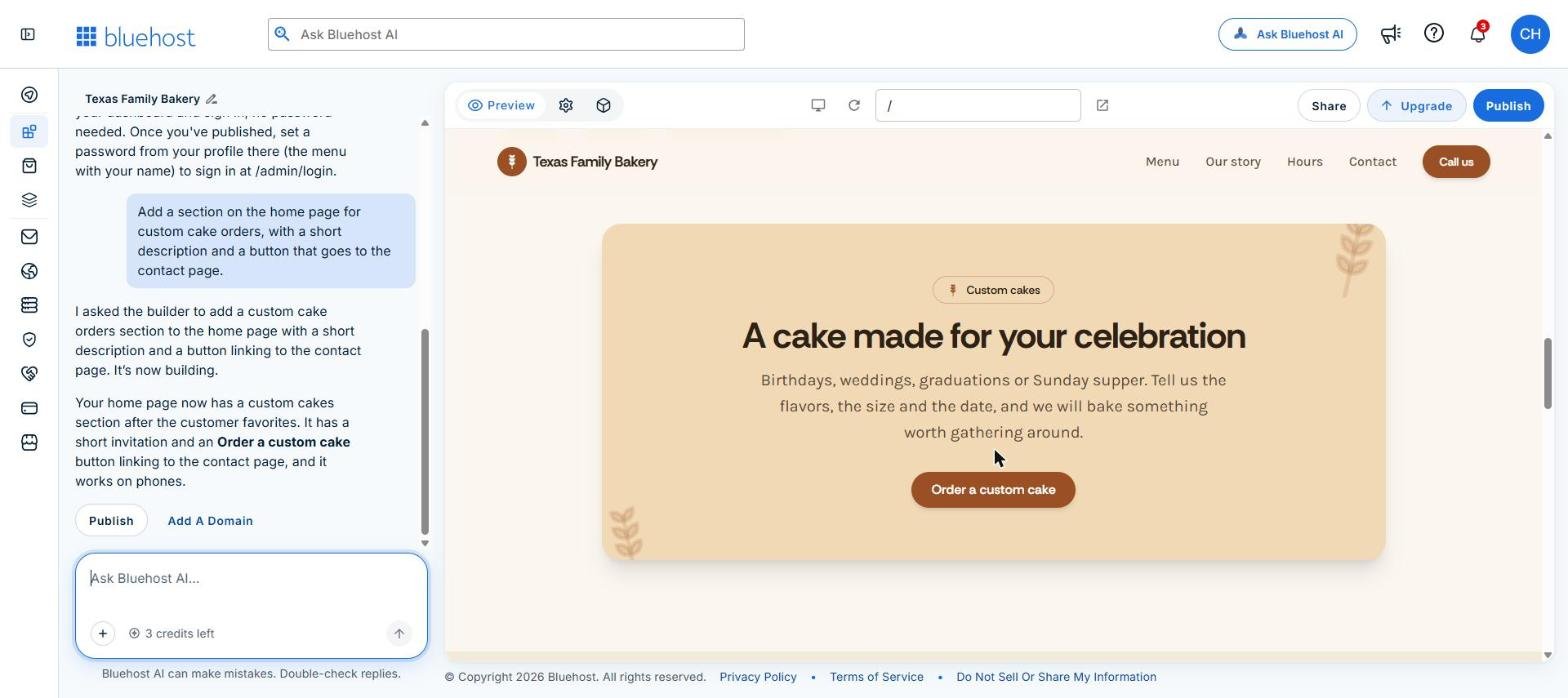
Our edit request was: "Add a section on the home page for custom cake orders, with a short description and a button that goes to the contact page." It took about a minute. The AI placed an "Order a custom cake" section after "Customer favorites," linked the button to the contact page and said it works on phones. It cost 1 credit, leaving 3.
The mobile preview is one click on the device icon. The layout reflowed with a hamburger menu.
Publishing on the Free plan took about 3 minutes and produced a free app.bluehost.ai address. The live page had a generated title and meta description, one H1 and nine images, all with alt text. The footer marked the address as a sample, with a 555 phone number and an .example email. We took the demo site offline afterwards, because the bakery is a made-up test business.
What Bluehost AI Builder builds and how the workflow works
You are choosing between a fast standalone builder and a more familiar WordPress site. Bluehost AI Builder is the standalone option. Bluehost says it can turn a plain-language description into a business website, portfolio, landing page, blog, booking tool, quote form, directory, customer portal or internal tool.
A web app runs in a browser and can do more than display pages. Bluehost says an AI Builder project can include saved submissions, user accounts, user roles, email alerts and an admin panel. That makes it suitable for a request form, appointment workflow or private customer area. It does not make the project a native phone app that can be published through the Apple App Store or Google Play.
The process begins with a description of the business or project. You can add a logo, photos, business details, documents, a website URL or a screenshot for design and tone reference. Bluehost says a reference site is used for inspiration, and its text and images are not copied automatically. An existing website cannot be imported directly.
AI Builder may ask up to three clarifying questions, then produces a live preview. You refine it through chat, check the private version, test the project and publish when it is ready. Bluehost lists mobile-responsive layouts for phones, tablets and computers, along with generated page titles, descriptions, headings and image alt text.
AI Builder replaced Bluehost's previous AI Website Builder for new customers, so older reviews under that name may describe a different WordPress-based service. Existing customers stay on the previous builder.
What you get on Free and what needs a paid plan
You want enough time to judge the first version before committing money. Bluehost AI Builder is $0 to start, no credit card, with paid plans from $20/mo. The AI Builder Free plan has no stated end date, includes five credits a day, up to 30 a month, and publishes to an automatically generated .app.bluehost.ai address.
That address cannot be customized and is not indexed by search engines, so Free works for drafting, testing forms and judging whether the builder understands your project. It is a weak final address for a business that needs a professional domain. Search visibility is not something any plan can promise.
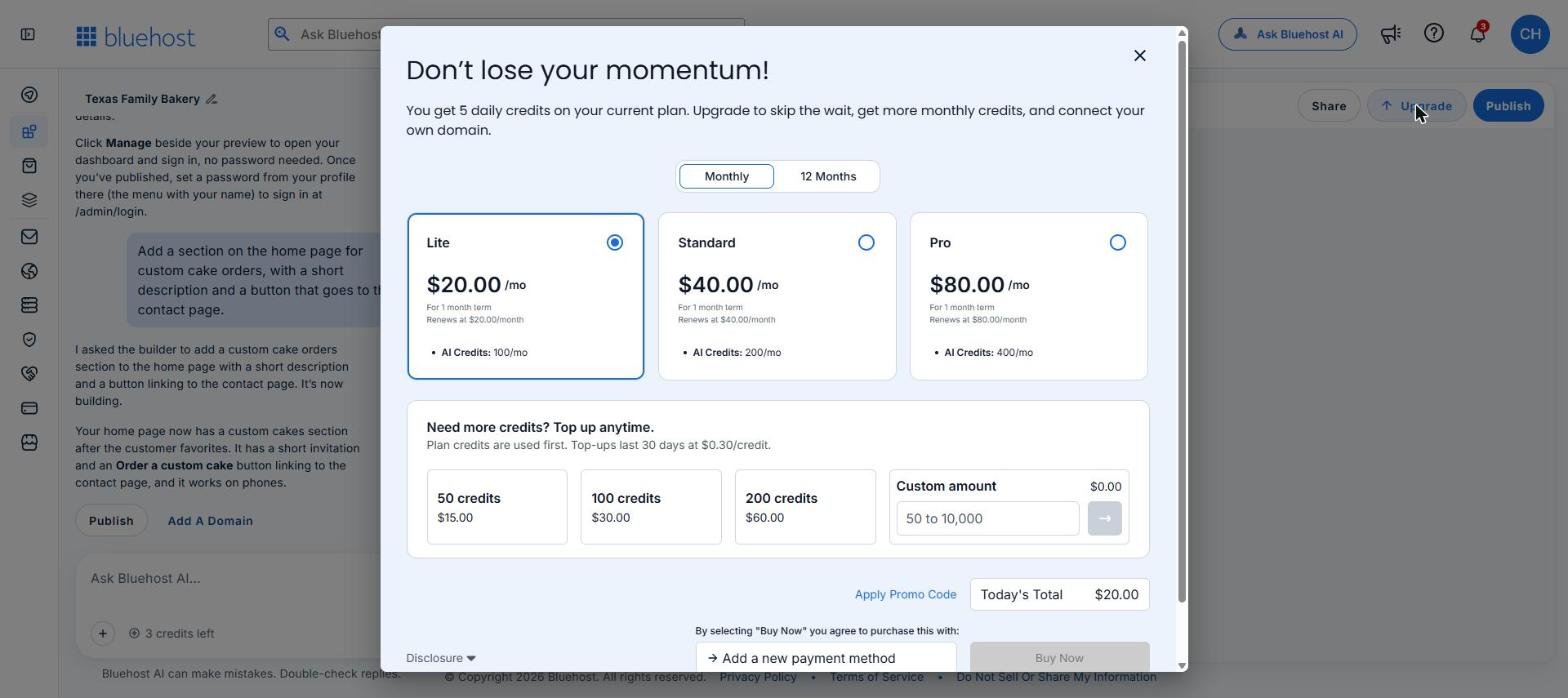
Paid plans add custom-domain connections and larger monthly credit allowances. The in-app upgrade panel showed these prices on November 10, 2026:
Monthly plans renew at the same monthly price. Plans renew automatically to the payment method on file unless you cancel before the renewal date, so confirm the term and renewal amount on the checkout page. A domain bought through Bluehost renews separately from the plan.
All plans include hosting, and Bluehost advertises 24/7 human help, including on Free. Hosting, previewing, publishing and sharing never use credits. Prices checked November 10, 2026. Compare the Bluehost AI Builder plans before you pick a term.
Credits, top-ups and the cost of editing
The important cost is not only the plan. It is how often you ask the builder to change the project. One message uses one credit, whatever the size of the request. A failed build uses one credit, and so does asking the builder to reverse a change. Clarifying questions are free.
Group your business details, services, prices, hours and style instructions into the first prompt, because a large batch of clear instructions costs the same as one small edit. Keep each PNG, JPG or WebP image within the 5 MB limit.
Plan credits expire after 30 days and do not roll over. Top-ups cost $0.30 a credit: 50 credits for $15, 100 for $30 or 200 for $60, with custom amounts from 50 to 10,000. Plan credits are used first, and top-ups last 30 days. Prices checked November 10, 2026.
When credits reach zero, only new changes pause. The published site stays online, and editing resumes after the next credit refresh, a top-up or an upgrade. A low-credit plan suits a stable brochure site, but repeated redesigns can use an allowance quickly.
Using your own domain: buy one or connect one
The free address is fine for a test, but most businesses want their own name. There are two routes, and the Free plan covers neither. Connecting a domain you already own elsewhere needs Lite, Standard or Pro. On Free, the Connect a domain button opens the upgrade panel.
The other route is Buy a domain, which searches inside the builder with your business name pre-filled. The app publishes to the domain once the order goes through. Bluehost says your own domain requires Lite, Standard or Pro, so do not count on a bought domain working on Free.
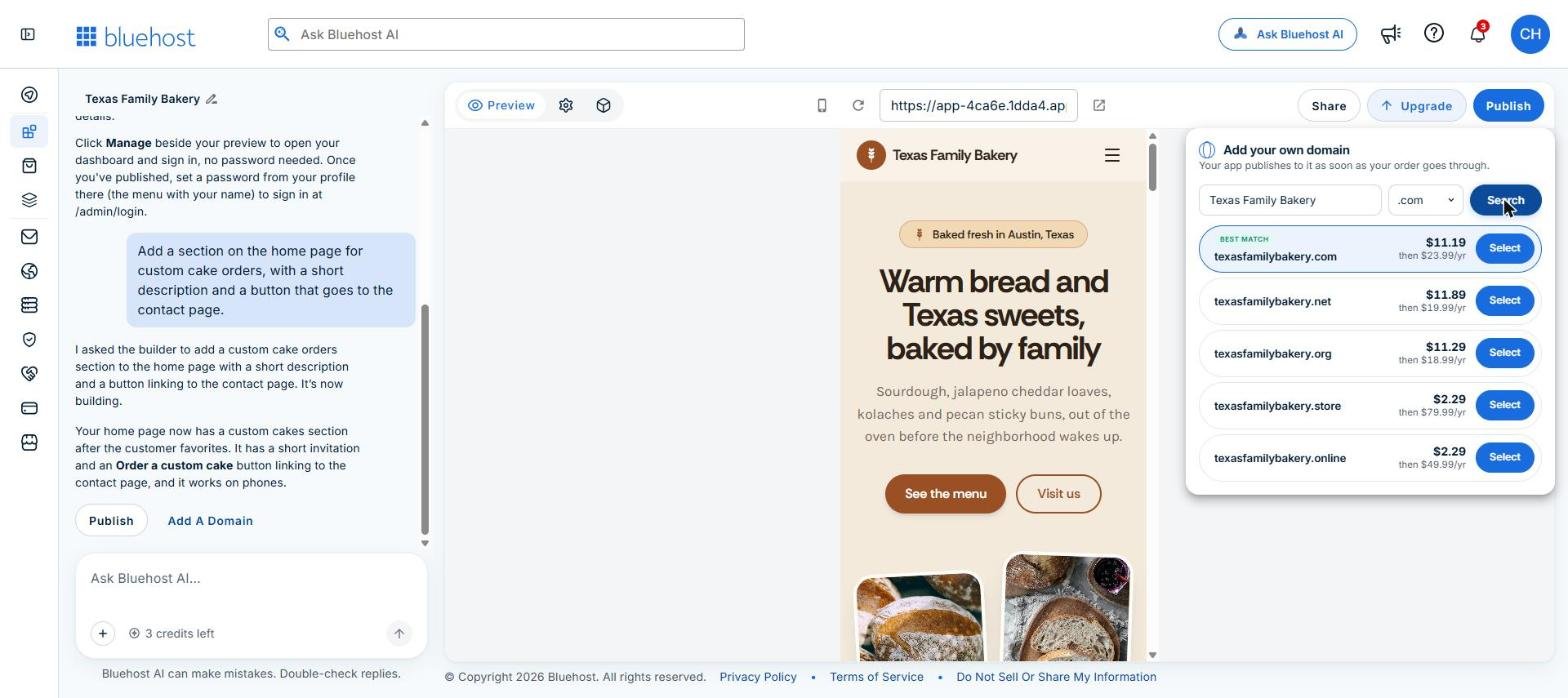
The search showed these prices on November 10, 2026, each first year, then renews at: .com $11.19, then renews at $23.99 a year; .net $11.89, then $19.99; .org $11.29, then $18.99; .store $2.29, then $79.99; .online $2.29, then $49.99. We did not buy a domain. Registering or renewing a domain is separate from connecting one you own, so check the renewal price before you buy. Prices checked November 10, 2026.
Bluehost AI Builder or WordPress hosting for a small business
You need WordPress hosting when you want the WordPress software, themes, plugins, files and migration options. You need AI Builder when you want a guided way to produce a standalone site or browser workflow without managing WordPress. Bluehost WordPress AI Builder creates a real WordPress installation inside a hosting plan, while Bluehost AI Builder creates a separate standalone project.
Bluehost displayed its WordPress Starter plan at $3.99 per month for a 36-month term, with $143.64 due upfront, renewing at $9.99 per month, checked November 10, 2026. The 30-day money-back guarantee excludes AI products, monthly-term services, domains and setup fees, so the WordPress price is a long prepayment, not a monthly payment you can cancel after one month.
WordPress is the stronger fit for a blog, a publication, a service business with many pages, or a site that may later move to another host. AI Builder is the simpler choice for a short business site, quote form, booking flow or private browser tool, with the tradeoff that future changes depend on its builder and credit system.
If you are deciding whether to keep a WordPress site or move it, follow the steps to move a WordPress site to a new host without losing email or data. For the wider Bluehost decision, use the Bluehost Review: Plans, Renewal Prices and Who It Fits.
What it cannot do: stores, native apps, export and backups
Ecommerce is not supported in AI Builder yet. If you sell products, Bluehost directs store projects to Bluehost AI Store. A brochure site can describe products or services, but that is different from running a checkout.
The builder creates browser-based web apps, not native apps for Apple or Google app stores. Migration is another dividing line: AI Builder provides no FTP access, source-code access or built-in full-project export. You can ask it to add a CSV export to an admin panel, but that does not export the whole project, uploaded assets and application logic.
There is no built-in restore backup or version history, and no undo button. A request to reverse a change uses one credit. Keep copies of your text, images and customer data outside the project, and confirm the renewal price before you pay for any plan. Bluehost's paid migration service lists $149.99 per website, excludes email and domain transfer, and may not fit a proprietary AI Builder project. Prices checked November 10, 2026.
Limits and terms to check before paying
You are taking on a hosted service, so ask Bluehost for the uptime, storage and bandwidth limits that apply before launching a high-traffic, data-heavy or email-dependent project. Bluehost's general terms say hosting is provided as is and does not guarantee uninterrupted, error-free or completely secure service. Ask where the project is hosted if location or regulation matters to you.
Email alerts require a connected Resend or Postmark account, because sending from a Bluehost mailbox is unavailable. A project that depends on notifications needs that separate email service and a test of every alert.
Bluehost's AI terms say generated output may be inaccurate, incomplete, biased, non-unique or infringing. Check business claims, prices, policies and legal wording before publishing, and do not enter bank-account numbers, medical records or detailed identity information into the builder.
Paid plans renew automatically to the payment method on file unless you cancel before the renewal date. To cancel, turn off auto-renewal in Bluehost Portal, Billing, Renewal Center. The plan stays active through the paid term and then returns to Free, and a connected domain is disconnected but stays registered to its owner. Treat the purchase as nonrefundable unless checkout or Bluehost support says otherwise, because Bluehost's refund policy excludes AI products and monthly-term services.
Checks before you publish
Build on Free first and inspect the preview. Replace every sample detail, review the generated titles, descriptions and image alt text, and test each form, booking flow, login and email alert. Test entries share one database with the live app, so delete them before launch.
Before paying, confirm the monthly credit allowance you expect to need, the renewal price on the checkout page and how you would rebuild the site if you leave. If you only need the project for one term, turn off auto-renewal after purchase.
Frequently asked questions
Does Bluehost have an AI builder for websites?
Yes. The current product is named Bluehost AI Builder, and it creates standalone websites and browser-based web apps from plain-language prompts. It is $0 to start, no credit card, with paid plans from $20/mo.
How much does Bluehost AI builder cost?
AI Builder Free costs $0 to start. Lite is $20 a month, Standard $40 and Pro $80 on a monthly term, with 100, 200 and 400 monthly credits. The 12-month terms show $16, $32 and $64 a month. Prices checked November 10, 2026.
Is Bluehost AI builder free?
Yes. Free has no credit-card requirement and no stated end date. It includes five credits per day, up to 30 a month, and publishes to a free .app.bluehost.ai address.
How do I use Bluehost AI Builder?
Describe the website or web app in one prompt, add brand files if you have them, then review the first version. Refine it through chat, check the mobile preview and publish when ready. Each message that changes the project uses one credit.
Can Bluehost AI Builder use my own domain?
Yes, on a paid plan. Connecting a domain you already own needs Lite, Standard or Pro. Free publishes only to the generated Bluehost address.
Does Bluehost AI Builder support online stores?
No. Bluehost says AI Builder does not support online selling or payment processing. Store projects are directed to Bluehost AI Store.
Do Bluehost AI Builder credits roll over?
No. Credits expire after 30 days and do not roll over. Free credits reset daily under its 30-credit 30-day cap, while paid credits are added monthly.
Can Bluehost AI Builder make an iPhone or Android app?
No. It creates browser-based web apps, not native apps published through the Apple App Store or Google Play. A native app requires a different development and publishing route.
Can I export a Bluehost AI Builder site?
AI Builder does not provide source-code access, FTP access or a built-in full-project export. You can ask it to add a CSV export to an admin panel, but keep separate copies of your content, files and data.
Does Bluehost AI Builder include backups?
Bluehost does not list a built-in restore backup or version history for AI Builder. Keep copies of important content and customer data outside the platform before making major changes.
Can I cancel Bluehost AI Builder?
Yes. Turn off auto-renewal in Bluehost Portal, Billing, Renewal Center. The paid plan remains active through its term, then returns to Free, while a connected custom domain is disconnected but remains registered to its owner.
Bluehost AI Builder is a sensible starting point for a small informational site or browser workflow when you want a working draft before paying. Start with Bluehost AI Builder on the free plan, then upgrade only if you need a custom domain or more credits. Choose WordPress hosting if you need plugins, deeper file control or a clearer migration path. For conventional visual editing or ecommerce, compare the options in Best Website Builder for Small Business: Costs and Fit.
Glossary
Find more reviews and guides on Even Reviews. Spotted something to correct? Contact us and include the page title.